

Description
Download Wagnardsoft Tools – Free, Secure PC Cleanup & System Repair for Windows
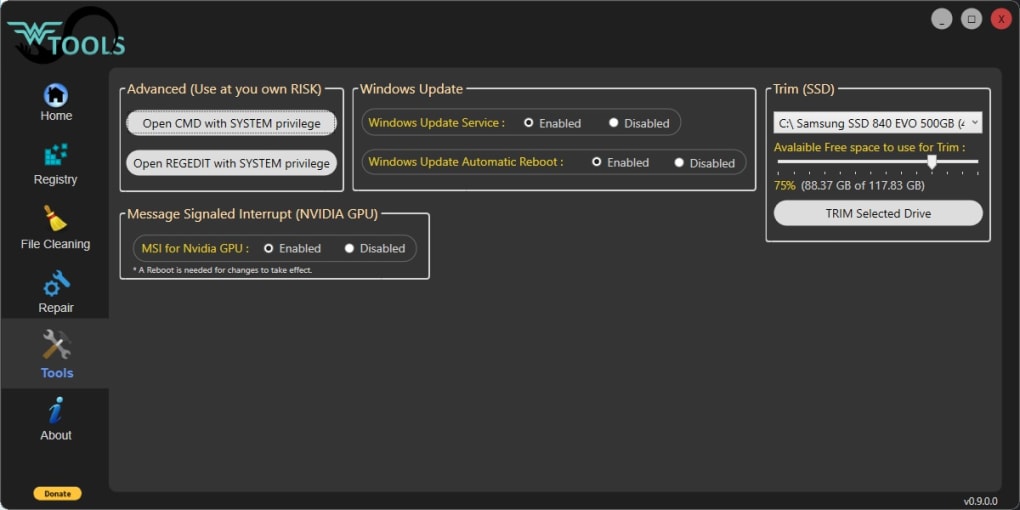
Wagnardsoft Tools is a lightweight, free utility designed to help Windows users reclaim storage space and maintain optimal system performance. This powerful yet simple software offers a suite of essential tools for cleaning junk files, repairing corrupted system components, and managing system health. Whether you're dealing with cluttered temporary files, outdated registry entries, or degraded drive performance, Wagnardsoft Tools provides a streamlined solution. With its intuitive dashboard interface, users can easily navigate through system diagnostics, file cleanup, registry maintenance, and system repair functions—all without requiring advanced technical knowledge. The software is particularly useful for users who want a no-cost alternative to premium system optimizers. While still in pre-release, it delivers solid core functionality, including Windows System File Checker integration, WinSxS folder cleanup, and drive trimming. Although the registry cleaning feature is currently unstable, the tool remains a reliable choice for routine maintenance. For cautious users, the built-in registry backup option adds an extra layer of security. Available for Windows 7 through Windows 11, Wagnardsoft Tools is a safe, virus-free download tested across multiple antivirus platforms. Keep your PC running smoothly—download Wagnardsoft Tools today and enjoy a faster, cleaner computing experience.
Intuitive Dashboard & Core System Maintenance Features
Wagnardsoft Tools stands out with its modern, dashboard-style interface that makes system maintenance both accessible and visually appealing. Upon launching the application, users are greeted with a clean, organized layout that displays real-time system information—such as CPU model, RAM capacity, GPU details, operating system version, and drive usage—right on the Home screen. This instant visibility allows users to monitor their system’s health at a glance, making it ideal for both casual users and tech enthusiasts who want to stay informed without diving into command-line tools or system settings. The software’s core functionality revolves around three main pillars: file cleaning, registry cleanup, and system repair. The File Cleaning module targets a wide range of temporary and unnecessary files generated by Windows and popular browsers like Chrome, Firefox, and Edge. This includes cache files, log files, thumbnails, and temporary internet files that accumulate over time and consume valuable disk space. The tool intelligently identifies these files and allows users to select which categories to remove, ensuring no essential data is lost during the process. The System Repair feature is one of the most valuable components of Wagnardsoft Tools. It leverages the built-in Windows System File Checker (SFC) and DISM utilities to scan and repair corrupted system files. The process is simplified into two steps: first, it checks the Component Store for inconsistencies using system backups, and second, it compares current system files against known good versions and replaces any that are damaged. This helps resolve common system errors, boot issues, and application crashes caused by corrupted system components. Additionally, the tool includes WinSxS folder cleanup and drive trimming support, which further enhances disk performance and longevity—especially beneficial for SSD users.Compatibility, Installation & Usage Guide
Wagnardsoft Tools is compatible with a wide range of Windows operating systems, including Windows 7, 8, 8.1, 10, and 11 (both 32-bit and 64-bit versions). This broad compatibility ensures that most users can benefit from the tool, regardless of their system age or configuration. The software is designed to be lightweight and resource-efficient, requiring minimal system resources during operation, which makes it suitable for older or low-end machines that struggle with heavier optimization tools. Installation is straightforward and hassle-free. Simply visit the official Wagnardsoft website, download the latest version of WTools (available as a portable .exe file), and run it directly—no installation is required. This portable nature means you can carry the tool on a USB drive and use it on multiple computers without leaving traces behind. Once launched, the application runs in a single window with no background processes, ensuring it doesn’t interfere with your daily workflow. To use Wagnardsoft Tools effectively, start by reviewing the system information on the Home tab. Then, proceed to the File Cleaning section to scan and remove temporary and junk files. Select the categories you want to clean (e.g., browser cache, Windows temp files), and confirm the cleanup. For system repair, navigate to the Repair tab and initiate the scan. The tool will automatically detect and fix corrupted files, displaying a progress report and final summary. If you plan to use the Registry Cleaning feature, proceed with caution—though currently unstable, it offers a backup option before any changes are made. Always back up your registry before performing any modifications, even if the tool provides a restore point.Pros, Cons & Frequently Asked Questions
- Pros:
- Completely free to download and use
- Lightweight and portable—no installation needed
- Intuitive dashboard interface for easy navigation
- Effective system file repair using SFC and DISM
- Supports WinSxS cleanup and drive trimming
- Virus-free and tested by multiple antivirus engines
- Registry backup option for safety
- Compatible with Windows 7 through 11
- Cons:
- Registry Cleaning feature is currently unstable and crashes
- Pre-release version may contain bugs or unexpected behavior
- Limited customization options for cleanup processes
- No scheduled automation or batch cleanup features
- Documentation and support are minimal
Frequently Asked Questions (FAQ)
-
Is Wagnardsoft Tools safe to use?
Yes, Wagnardsoft Tools is considered safe. It has been scanned by multiple antivirus engines and confirmed to be free of malware. The developers recommend backing up the registry before any changes, which adds an extra layer of protection. However, due to its pre-release status, use it cautiously and avoid critical system modifications.
-
Can I use Wagnardsoft Tools on Windows 11?
Absolutely. Wagnardsoft Tools is fully compatible with Windows 11, as well as Windows 10, 8.1, 8, and 7. It’s designed to work across all modern Windows versions without compatibility issues.
-
Does Wagnardsoft Tools require installation?
No, it’s a portable application. You can download the .exe file and run it directly without installing anything. This makes it ideal for use on shared or restricted computers.
-
Why is the registry cleaning feature crashing?
The registry cleaning function is currently unstable due to the software being in pre-release development. The developers are actively working on fixing this issue. Until then, it’s best to avoid using this feature or ensure you have a full system backup.
-
How often should I run Wagnardsoft Tools?
For optimal performance, run the file cleanup once a month and the system repair every few months. Use the tool after major software installations or when you notice system slowdowns.
Conclusion: A Free, Lightweight Tool Worth Trying
Wagnardsoft Tools offers a compelling solution for users seeking a free, no-frills way to maintain their Windows PC. While it’s still in its pre-release phase and has some technical limitations—especially with the unstable registry cleaning function—the core features are solid and effective. The ability to repair corrupted system files, clean junk data, and manage disk health makes it a valuable addition to any user’s toolkit. Its lightweight design, portability, and virus-free status further enhance its appeal. For those who want to avoid paying for premium system optimizers, Wagnardsoft Tools delivers real value. It’s especially useful for users with older systems or limited storage space. Just remember to back up your registry before any changes and avoid relying on the registry cleaning feature until it’s stable. If you’re looking for a secure, free, and straightforward way to keep your Windows machine running smoothly, download Wagnardsoft Tools today and take control of your system’s performance.Guides & Tutorials for Wagnardsoft Tools
How to install Wagnardsoft Tools
- Click the Preview / Download button above.
- Once redirected, accept the terms and click Install.
- Wait for the Wagnardsoft Tools download to finish on your device.
How to use Wagnardsoft Tools
This software is primarily used for its core features described above. Open the app after installation to explore its capabilities.
User Reviews for Wagnardsoft Tools 0
No reviews found





